
Capital gains tax and negative gearing changes have been making headlines lately, and property investors everywhere are asking the same thing-
“What does this mean for my property portfolio?”
And the answer can vary widely depending on your property values, how ownership is structured, your income levels, inflation assumptions, and even future growth rates. As a result, understanding the potential impact is not so straightforward.
That’s why, to help property investors, we have developed a CGT and Negative Gearing Calculator. It would help you model existing property portfolios and compare potential outcomes under different assumptions, including property growth, indexation, and ownership arrangements.
But while the calculator is for both capital gains tax and negative gearing calculations, this guide specifically is the explanation of the CGT calculation side.
In this guide, we explain how this calculator actually works step-by-step, the assumptions behind it, considering one scenario for your reference. So read till the end to get through it in simple terms.
Before You Start- Important Things to Know
Before using the calculator, just remember that it is designed as an educational modelling tool. The figures generated are purely based on assumptions you enter, including property values, ownership shares, income levels, inflation assumptions, and expected growth rates.
What Proposed CGT Changes Does This Calculator Model?
Also, before you move further to use the calculator, understand what it is actually comparing. For existing investment properties, the calculator models the proposed capital gains tax treatment discussed in recent policy announcements.
Like, your current CGT rules keep running exactly as they are until 30 June 2027. After that, from 1 July 2027, the new indexation-based approach takes over.
Understanding the Assumptions Behind the Calculator
Now, let us tell you the assumptions the calculator uses. So, here, the default indexation rate is set at 3.42%, based on recent historical indexation trends. You can adjust this higher or lower depending on your own inflation expectations.
The calculator also uses assumptions for-
- Property purchase price
- Current property value
- Expected annual growth rate
- Upfront purchase costs
- Selling commission (default 1.5%)
- Ownership shares
- Individual owner incomes
It’s because future property growth and inflation cannot be predicted with certainty. So, these figures should be treated as modelling assumptions rather than forecasts.
Step-by-Step Process To Use the CGT and Negative Gearing Calculator- CGT Aspect
Now, to get started with CGT calculation, simply follow these steps-
STEP 1- Select the ‘Existing Portfolio’ Tab

Source- Capital Gains Tax and Negative Gearing Calculator – Nfinity Financials
Once you reach the calculator page, your first step is to click on Existing Portfolio. This specific section is built for any properties you already owned before the policy cut-off date of 12 May 2026.
With this, you can check how your CGT would change over a 10-year horizon in both cases, before and after the proposed changes.
STEP 2- Enter Your Property Details

Source- Capital Gains Tax and Negative Gearing Calculator – Nfinity Financials
Next, fill in the details of the property you’d like to analyse. These details would help the calculator find out how your capital gains might grow over time, such as over 10 years. So, for this, you need to enter –
- The property’s original purchase price
- Current property value
- Expected annual growth rate
- Any upfront purchase costs
- Ownership share
For example, if you bought an investment property for $600,000 a couple of years ago, and today it’s worth $800,000. If you expect it to increase by 5% per year, enter that as your growth rate.
Along with that, you can add upfront costs you paid as well when buying the property, like stamp duty, buyer’s agent fees, and other setup costs. And if those costs came to $40,000, enter that figure into the calculator.
Finally, specify the ownership split. Like, if you and your partner have an equal share in the property, simply enter a 50/50 share.
STEP 3- Enter Owner Details and Individual Incomes

Source- Capital Gains Tax and Negative Gearing Calculator – Nfinity Financials
Next, scroll down to the income fields. Because capital gains are added to your personal taxable income, your current tax bracket can completely change the final bill. So, input the individual earnings for everyone on the title.
For example, if you and your partner own the property together, you could enter $120,000 as Owner 1’s annual income and $170,000 as Owner 2’s annual income. From there, the tool calculates your estimated tax impact based on what you’ve entered.
STEP 4- Reading Your 10-Year Results Table

Source- Capital Gains Tax and Negative Gearing Calculator – Nfinity Financials
Once your details are in, the calculator pulls up a year-by-year projection covering the next decade. This matrix lets you contrast your projected capital gains tax under both the old and new rules side by side.
For every calendar year, you will see a clear breakdown of:
- Estimated CGT under the current rules
- Estimated CGT under the proposed rules
- The exact dollar difference between the two outcomes
- Your estimated final profit after tax
But the easiest way to make sense of this data is to pick a specific year and look at the numbers across the row.
For example, using the sample scenario discussed earlier-
- Purchase price- $600,000
- Current value- $800,000
- Annual growth rate- 5%
- Ownership split- 50/50
If the property were sold before 30 June 2027, the calculator may show little or no difference between the two approaches. It’s because for this period, the same old CGT rules would be active.
But the comparison would become more relevant from 1 July 2027 onwards, when the calculator starts modelling the proposed indexation-based approach. Because depending on the assumptions entered, the gap between the two outcomes may become larger or smaller over time.
Now, here, while many investors naturally focus on the tax figures, it can also be useful to review the final column showing the estimated profit after tax. You can have a better understanding of how different growth and inflation assumptions can affect your overall outcome for an investment property over time.
Why Do The Results Look Similar Before 1 July 2027?
When you look at the results table, you might notice that in the early years, the projected CGT outcomes under both methods appear the same. That’s because the calculator continues applying the current CGT rules right up until 30 June 2027.
From 1 July 2027 onwards, the model switches to the proposed indexation‑based approach. So, you’ll start to see the differences in outcomes reflected from that point depending on the assumptions you entered.
STEP 5- Test Different Growth and Inflation Scenarios
One of the most useful features of the calculator is the ability to adjust both property growth and indexation assumptions. Because future market conditions are uncertain, many investors prefer to compare multiple scenarios rather than rely on a single estimate.
For example, you could test-
- Property growth of 2%
- Property growth of 5%
- Property growth of 10%
Alongside different indexation assumptions such as-
- 2%
- 3%
- 3.42%

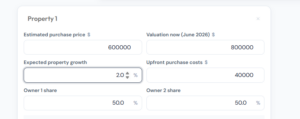
Figures- Property growth and indexation of 2%
Source- Capital Gains Tax and Negative Gearing Calculator – Nfinity Financials

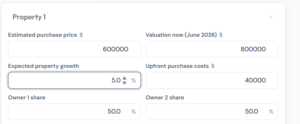
Figures- Property growth at 5% with indexation of 3%
Source- Capital Gains Tax and Negative Gearing Calculator – Nfinity Financials

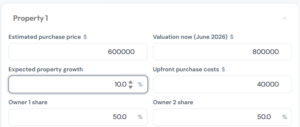
Figures- Property growth at 10% with indexation of 3.42% (default)
Source- Capital Gains Tax and Negative Gearing Calculator – Nfinity Financials
It’s because running different combinations can help you understand how the proposed CGT treatment may affect outcomes under varying market conditions.
STEP 6 – Add Multiple Properties to Your Portfolio

Figure- Add Multiple Properties to Your Portfolio
Source- Capital Gains Tax and Negative Gearing Calculator – Nfinity Financials
Then, if you own more than one investment property, click Add Property.
The calculator allows you to model several properties within the same portfolio. Like, for each property, you can enter-
- Purchase price
- Current value
- Growth assumptions
- Ownership share
- Purchase costs
The calculator will then display-
- Individual property results
- Combined portfolio results
For example, you might have-
Property 1 purchased for $600,000 and currently valued at $800,000 with an estimated growth rate of 10%, considering indexation at 2%.
Property 2 purchased for $450,000 and currently valued at $550,000 with an estimated growth rate of 5%, considering indexation at 2%.
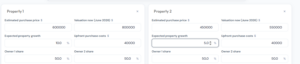
Figure- Adding 2nd property details
Source- Capital Gains Tax and Negative Gearing Calculator – Nfinity Financials
So, here, once you’ve added both properties, the calculator pulls everything together into a portfolio‑level view. This makes it easier to see how each property contributes to your overall CGT position under different assumptions, as shown below-
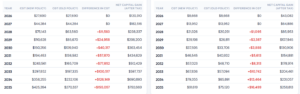
Figure- Results of CGT calculations for both properties
Source- Capital Gains Tax and Negative Gearing Calculator – Nfinity Financials
STEP 7- Review Your Combined Portfolio Results
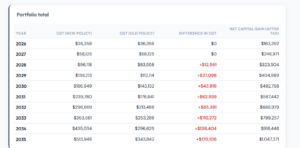
Figure- Combined property portfolio for the example used in Step 6
Source- Capital Gains Tax and Negative Gearing Calculator – Nfinity Financials
Then, if you own multiple properties, the calculator would not just show you results for each property separately. It also creates a combined portfolio view. This portfolio table will bring together the projected results from all properties and show you
- Total CGT under the current rules
- Total CGT under the proposed rules
- The overall difference between the two
- Estimated profit after tax across the portfolio
Then, it would be easier for you to understand how multiple properties may affect your overall CGT position rather than reviewing each property individually.
How Does the Calculator Estimate CGT?
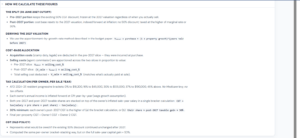
Figure- How Does the Calculator Estimate CGT
Source- Capital Gains Tax and Negative Gearing Calculator – Nfinity Financials
At this point in time, you may be wondering how the calculator arrives at its figures.
So, the calculator works by estimating your property’s capital gain using the details you provide, like
- The purchase price
- Current value
- Expected growth rate
- Ownership structure and costs
It also takes into account
- Upfront purchase costs
- Estimated selling costs
- Ownership percentages
- Individual owner incomes
It then applies the relevant tax rules year by year, like
- Up to 30 June 2027 → current CGT rules
- From 1 July 2027, → proposed indexation‑based approach will be compared against the current method.
The final results, then you see, would simply be the calculator’s estimates, built from the assumptions you entered.
Important Note- To explain these steps, we have taken only one scenario, you can test multiple scenarios as per your preferences and situation.
What Can Investors Learn From The Steps Above?
Looking across all the steps above, we hope one thing is clear to you that small changes in assumptions can produce very different outcomes over time.
For example-
- Higher property growth can change the projected CGT outcome significantly.
- Higher inflation assumptions can increase the impact of indexation.
- Different ownership structures may affect how CGT is calculated between owners.
- Multiple properties can change the overall portfolio result.
That’s exactly why many investors choose to test several combinations rather than relying on a single scenario.
Final Thoughts
Therefore, the purpose of this calculator is not to predict future tax outcomes. Instead, it is designed to help investors model different possibilities using their own assumptions. You can adjust the numbers and ownership details to see how different paths could affect your CGT.
But as with any modelling tool, the results are illustrative. And they should be used as a guide along with professional tax advice tailored to your personal circumstances.
To learn more, you can call us at 1300 GET LOAN, 0456 456 267 or book your time at http://bit.ly/4my3cAw.
DISCLAIMER- The CGT and Negative Gearing Calculator is intended as an educational modelling tool only. So, the results should be viewed as illustrative estimates based on the assumptions entered.
For any personal advice, speak with a qualified tax accountant or adviser.
Frequently Asked Questions
Here are some more answers to questions you probably have-
Q1. How is CGT calculated in Australia?
In general, CGT is calculated by subtracting your cost base (purchase price plus eligible costs like stamp duty and fees) from the sale price. The gain then is added to your income and taxed at your marginal tax rate. But here, discounts or exemptions may apply depending on your situation.
Q2. How much capital gains tax will I pay on $100,000?
There is no fixed CGT amount on a $100,000 capital gain. The tax payable depends on factors such as
- Your taxable income
- Ownership structure
- Available capital losses
- Any CGT concessions that apply
And because CGT forms part of your income tax, two investors with the same capital gain can end up paying very different amounts of tax.
Q3. Is CGT 50% in Australia?
Not exactly. Under the current rules, eligible individuals and trusts may receive a 50% CGT discount on assets held for more than 12 months. But this does not mean you pay 50% tax. Because only half of the capital gain is included in your taxable income before your marginal tax rate is applied.
Meanwhile, the Federal Budget 2026 announced proposed changes that would replace the current 50% discount with an indexation-based approach from 1 July 2027, subject to legislation.
Q4. How do I calculate my CGT?
To calculate CGT, you can follow these steps-
- Work out the sale price of the asset.
- Calculate the asset’s cost base.
- Subtract the cost base from the sale price.
- Apply any eligible capital losses.
- Apply any available CGT concessions or discounts.
- Add the remaining capital gain to your taxable income.
Many investors use CGT calculators as well to model different scenarios before speaking with their accountant or tax adviser.
Q5. How to avoid CGT in Australia?
You generally can’t fully avoid CGT, but you may reduce it using legal options like capital losses, exemptions (like main residence), timing strategies, or ownership structuring. Rules vary by case, so advice matters.
